


Cricbuzz - Live Cricket Scores
3.715.53K Reviews
App Specs
- Version
- 16.04.00
- Updated On
- License
- Free
- Downloads
- 100,000,000+
- Developer
- Cricbuzz.com
- Categories
- Sports
- Platform
- Android, iOS
Screenshots
 Analysis by AppCompare
I judge a cricket app by how quickly it helps me answer three practical questions: what is happening now, what did I miss, and what should I follow next? Cricbuzz - Live Cricket Scores is built around those habits. It brings match information and cricket coverage together, so I can check a score during a spare minute and stay with the story when I have longer to read. It is a free sports app from Cricbuzz.com, and its focus makes it most useful to people who follow cricket regularly rather than those looking for a broad sports feed.
Start with the way you follow cricket
Before choosing any score app, I’d think about whether I mainly want a quick result, a detailed match companion, or a place to read cricket news. A basic scoreboard can be enough if I only check who won. If I want context, commentary, schedules, and articles in the same place, a more cricket-focused app makes better sense. Cricbuzz aims to cover that wider routine, although the extra material can feel like more than a casual follower needs.
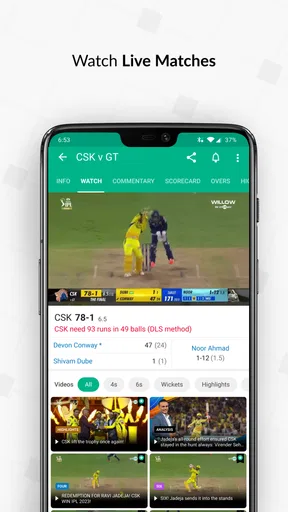
It has been around since February 18, 2011, and its scale suggests that it has become a familiar destination for cricket followers: it has more than 100 million installs, an average rating of 3.7 from around 3.1 million ratings, and about 16,000 written reviews. Those figures are useful context, not a guarantee that every part of the experience will suit you. The app is rated for Everyone, and version 16.04.00 requires Android 7.0 or later. Its current store description also highlights live streaming of major cricket events, including the IPL and World Cup, which may matter if you want more than scores.
Following a match without a television
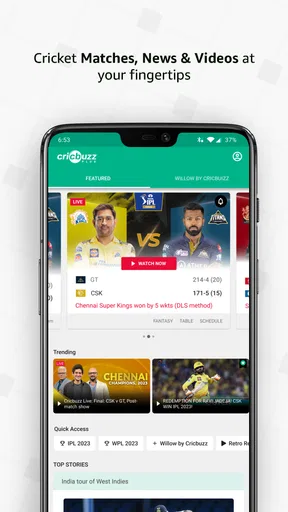
First off, the interface is super user-friendly. You open the app, and bam! Right there in front of you are all the live matches, upcoming fixtures, and latest news. It’s neatly organized, so even if you’re not tech-savvy, you’re not going to get lost. I really appreciate how everything is just a tap away—no more digging through menus to find what you need.
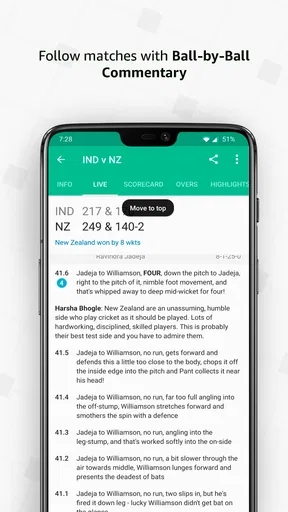
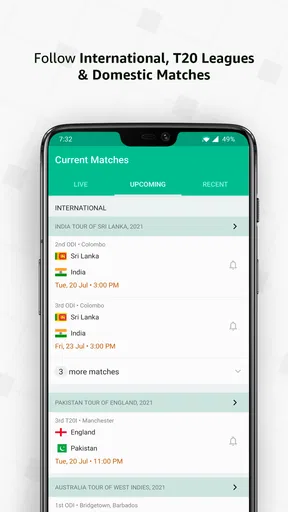
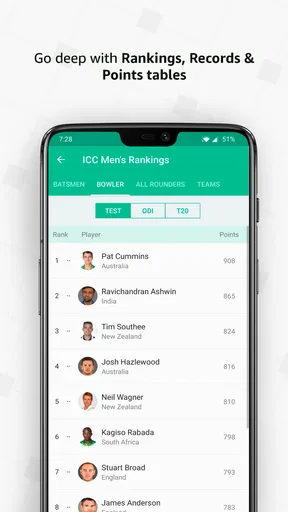
Now, let’s talk about the live scores. They’re fast. Like, really fast. You can literally see the scores updating in real-time, which is perfect when you can’t be near a TV. Plus, it’s not just the scores; you get ball-by-ball commentary. It’s almost like listening to a radio broadcast but with the added advantage of visuals. You can also check player stats, team rankings, and upcoming match schedules. Everything you need is in one place.
Use commentary to recover the shape of an innings
A score alone can be misleading: a team may be progressing steadily, or the match may have swung on a cluster of events. Ball-by-ball commentary is useful when I arrive midway through an innings because it gives me a way to catch up without watching a full replay. I’d use the score and commentary together: first check the current situation, then scan back through the recent sequence to understand why the numbers changed.
This is also a practical option when watching is impossible. Imagine you’re waiting for a bus while a close match is underway. You can glance at the score, read a few commentary updates, and put your phone away when your ride arrives. That is a better fit for short interruptions than a video stream, which asks for more attention and a steadier connection. If you have time to watch, the app’s live-streaming focus may be relevant; if you only need the match state, scores and text are the lighter way to keep up.
Worth Reading Before You Choose

Baby Panda World Brings Quick Play to Modern Phones, but Its Game Library Feels Busy

ESPN’s Live Game View Makes Following Close Games Easier

QuizzLand Review: A Good Fit for Short Trivia Breaks, Not Every Player

Basketball Stars: Multiplayer Is Fast, but Can It Recover When Matches Go Wrong?

WEBTOON Turns Phone Updates Into a Better Reading Routine

Link to Windows Runs on Shared Habits, Not Social Feeds
News for fans who want context
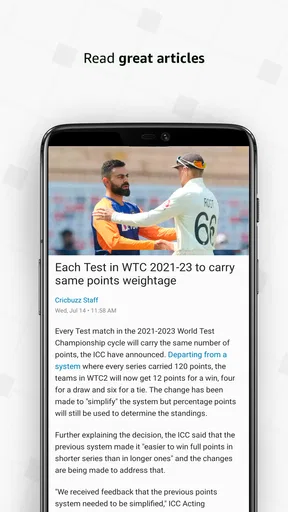
Besides scores, Cricbuzz keeps me updated with the latest cricket news. Whether it’s a player transfer, injury updates, or analysis of recent matches, it’s all covered. The articles are well-written and insightful, perfect for someone who wants to dive deeper into the game. And the best part? There are exclusive interviews and opinion pieces from cricket legends. It’s like having a mini cricket magazine in your pocket!
For those who love discussions, there’s a comments section under most articles and updates. It’s a great place to engage with other cricket fans, share thoughts, and sometimes just marvel at the passion people have for cricket. I’ve had some interesting exchanges there, that’s for sure!
The editorial side is most valuable when it answers a question the scoreboard cannot: why a selection or result matters, what a player’s form means, or how a match fits into a larger tournament. I would treat opinion pieces as informed perspectives rather than settled fact, especially when fans are debating a contentious decision. Comments can add lively reactions, but they are user discussion, not a substitute for match reporting. If you prefer a quiet, numbers-only experience, the social layer may be something you simply ignore.
Alerts that fit around a busy day
One of the features I can’t live without is the customizable notifications. You can set alerts for your favorite teams and matches. So, if there’s a wicket or a six, you’ll know immediately. It's particularly handy when you’re busy but don’t want to miss out on crucial moments. I’ve found it really useful during busy workdays when I can’t watch the match live.
A useful approach is to be selective about what you follow. During a packed day of fixtures, alerts for every match can turn a helpful companion into a steady stream of interruptions. I’d start with the teams or games I genuinely care about, then adjust if the notifications are either too quiet or too frequent. That small bit of setup makes the app more useful as a check-in tool instead of another feed demanding attention.
Also, they have this cool feature where you can listen to audio commentary. It’s perfect for when you’re driving or doing chores around the house—just plug in your earphones, and you won’t miss a thing!
For safety, I would not try to manage commentary while driving. It is better to set it up before a journey and listen without handling the phone, or save it for chores and other situations where audio is convenient. Compared with text, audio lets me follow along while my eyes are elsewhere, but it is less suitable for a noisy place or a moment when I need to focus on something else.
What it does better than a simple score feed
The main advantage over a stripped-back results app is the mix: scores, commentary, schedules, statistics, news, and discussion sit within a cricket-specific experience. That means I can go from checking a live game to finding the next fixture or reading a match story without switching between separate sources. For a fan who follows several teams or competitions, that continuity is more useful than a bare list of scores.
There are good reasons to choose another kind of app, too. If you follow many sports and want one place for all of them, a broader sports app may be less cricket-centric and more convenient. If your priority is watching rather than reading, a dedicated streaming service may be the better starting point, depending on what is available to you. And if you check cricket only occasionally, a search result or a lightweight scoreboard may be quicker than opening an app with news and community features. The right alternative depends on whether breadth, video, or minimalism matters more than cricket depth.
Accessibility and everyday trade-offs
Another thing worth mentioning is how smooth and responsive the app is. I’ve used it on both Android and iOS, and it runs beautifully on both platforms. No annoying crashes or bugs, which is a huge relief. And the app doesn’t seem to consume too much battery, so that’s another plus. I can have it running in the background without worrying about my phone dying by midday.
Plus, it’s accessible in various languages, making it user-friendly for non-English speakers. Cricket is a global sport, and Cricbuzz really accommodates that diversity.
As with any live sports app, the experience depends partly on when and how you use it. A live stream is a more demanding choice than checking a score, and a busy news feed can be unnecessary if all you need is one result. I’d use text updates for quick checks, save longer reading for breaks, and choose audio only when listening fits the situation. This keeps the app useful without expecting every feature to serve every moment.
The cost is easy to understand: it is free to install, so trying it does not require paying upfront. The more meaningful cost is attention. If you turn on too many alerts or get drawn into every discussion, the app can take up more of your day than you intended. I’d also avoid switching from another cricket app in the middle of a tournament without first setting up the teams and notifications I care about; a few minutes of personalizing any replacement can make the difference between a helpful match companion and a cluttered feed.
Who should choose it—and who may not need it
I’d recommend it to someone who follows cricket across the week and wants to move naturally between live updates and the wider conversation around a match. It is especially handy for people who cannot sit in front of a screen all the time: a quick score check, a skim of commentary, or an audio update can fit into a commute break or a quiet moment at home. Fans who enjoy match analysis and reader discussion will also find more to explore than they would in a simple scoreboard.
I would not make it my first choice if I rarely follow cricket, dislike notifications, or want an uncluttered app that only reports final results. It may also be the wrong fit if watching live video is the only thing you care about; in that case, compare the streaming options available in your region before settling on a score-and-news app. The store description highlights live streaming of events such as the IPL and World Cup, but I would still choose based on the kind of access and viewing experience I want, rather than assuming that scores, articles, and video are interchangeable.
Final Thoughts
So, in a nutshell, if you’re passionate about cricket, Cricbuzz - Live Cricket Scores is a must-have app. It’s like having a 24/7 cricket companion right in your pocket. From live scores and breaking news to in-depth analysis and interactive features, it’s got everything a cricket fan could ever want. It’s not just an app; it’s an experience. So why wait? Give it a whirl and see how it changes your cricket-watching game!
And if you’re ready to dive into the world of cricket with Cricbuzz, head over to your app store and download it now. You won’t regret it!
Pros
- Comprehensive live score updates.
- User-friendly interface with easy navigation.
- Detailed match analysis and statistics.
- Customizable notifications for favorite teams.
- Ad-free experience with premium subscription.
Cons
- Heavy data usage on mobile networks.
- Limited features in offline mode.
- Occasional delays in score updates.
- Premium features hidden behind paywall.
- App size may be large for some devices.
FAQs for Cricbuzz - Live Cricket Scores
What features does Cricbuzz offer for cricket enthusiasts?
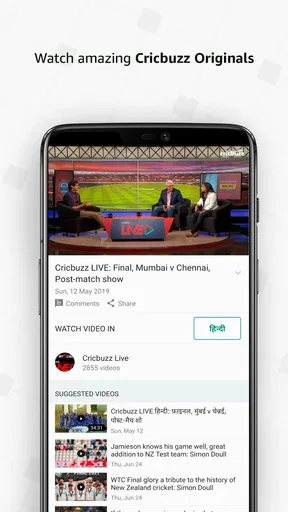
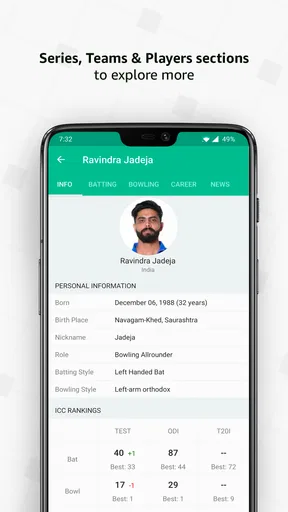
Cricbuzz provides comprehensive live cricket scores, ball-by-ball commentary, and detailed match statistics. Users can access player profiles, team rankings, and tournament schedules. The app also offers video highlights, expert analysis, and news articles to keep fans updated on the latest happenings in the cricket world.
Is Cricbuzz free to download and use?
Yes, Cricbuzz is free to download on both Android and iOS platforms. While the app offers a plethora of features at no cost, it is ad-supported. For users who prefer an ad-free experience, a premium subscription option called Cricbuzz Plus is available, offering additional content and features.
Does Cricbuzz provide updates for all cricket formats?
Cricbuzz covers all major cricket formats including Tests, One Day Internationals (ODIs), and T20s. It also provides updates for domestic leagues like the Indian Premier League (IPL) and other international tournaments. The app ensures that cricket enthusiasts can follow their favorite formats and teams without missing any action.
How reliable are the live scores and updates on Cricbuzz?
Cricbuzz is renowned for its fast and reliable live score updates. The app features real-time ball-by-ball commentary, ensuring that users receive the latest information as matches progress. The reliability of its updates has made Cricbuzz a trusted source for cricket fans worldwide.
Can I customize notifications and alerts on Cricbuzz?
Yes, Cricbuzz allows users to customize notifications based on their preferences. You can set alerts for specific matches, teams, or tournaments. This feature ensures that fans receive timely updates about their favorite teams and players, keeping them engaged throughout the cricket season.


